In today's world, creating an effective resume (CV) for job applications is one of the most important steps in your career journey. Especially with the widespread use of mobile devices, practical solutions have been developed to meet the needs of job seekers. Creating a CV from mobile devices offers a fast and user-friendly experience. In this article, we will explore the easiest methods for creating a CV using Android and iOS devices in detail.
Mobile devices significantly speed up the process of creating necessary documents in today's job market. Especially for individuals with time constraints, managing the resume preparation process with just their phones or tablets, without having to sit at a computer, is extremely advantageous. So, what are the benefits of creating a CV with mobile devices?
In this article, we will discuss the most effective methods for creating a CV from mobile devices, popular applications you can use, and tips to keep in mind. Among the most important elements to consider while creating your resume are structuring your content correctly and effectively using visual elements. With mobile devices, you can easily carry out all these steps and take your job applications to the next level.
Mobile devices have become an indispensable part of our lives, and this is also reflected in the job search process. Particularly, the advantages of creating a resume using mobile devices allow users to easily design their resumes without time or location constraints. Mobile applications and websites provide users with a fast, practical, and user-friendly interface, making the resume preparation process quite simple.
First advantage: Mobile devices allow users to create their resumes from anywhere they choose. For example, it is possible to design an impressive resume with just a few taps while sitting in a café or traveling on public transport.
Additionally, mobile applications often provide templates and guidance, enabling users to achieve a professional appearance. Users can select one of the templates suitable for the job position and easily fill in their content to personalize their resumes. Moreover, these applications typically include features like spell check and grammar check, minimizing the chances of making mistakes.
Second advantage: Mobile devices facilitate easy sharing of documents. After completing your resume, you can share it with potential employers via email or social media with just a few clicks. This accelerates the application process and helps job seekers gain a competitive advantage.
In conclusion, there are many advantages to creating a resume using mobile devices. User-friendly interfaces, practicality, and quick sharing options make the job search process more efficient. Thanks to mobile devices, you can create your resume anytime and anywhere, bringing you one step closer to your career goals.
Mobile devices have become an indispensable part of our lives today. Creating an impressive CV (curriculum vitae) is an important step in your career journey, especially for job applications. Many applications designed for smartphones running Android and iOS allow users to easily create their CVs. These applications stand out with their user-friendly interfaces and various template options.
Advantages of CV creation applications:
Some of the best CV creation applications for Android and iOS include popular options like Canva, Resume Builder, and CV Maker. These applications provide customized templates according to users' needs, helping them achieve a professional look. Additionally, while creating your CVs through these platforms, you have the opportunity to add visual elements to make them more eye-catching.
Remember, an effective CV is the best way to grab the attention of potential employers. Therefore, you should take enough time to create a professional and impressive CV using mobile applications.
Moreover, these applications allow users to save their CVs in PDF format. This makes it easy to share your applications and facilitates employers in opening the documents. As a result, creating a CV from your mobile devices has become an essential skill in the modern job market, and the applications mentioned above will greatly assist you in this process.
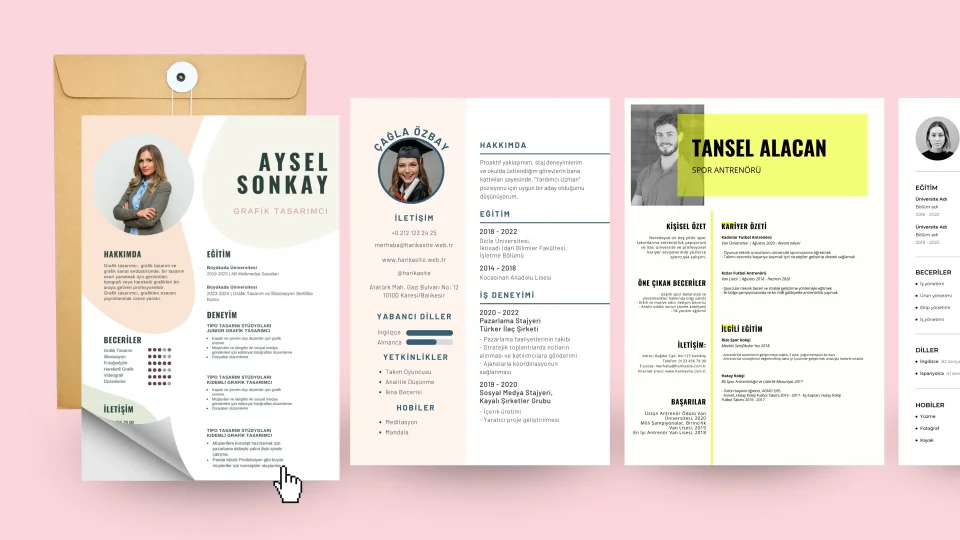
Creating a resume (CV) from mobile devices provides great convenience in today's fast-paced and technological world. Various applications and websites available on both Android and iOS platforms allow users to prepare professional-looking resumes in just minutes. Especially for job applications, a quick and effective CV helps candidates stand out. In this article, you will discover how to easily create a CV using mobile devices step by step.
The first step is to select a suitable app or website before starting the CV creation process. User-friendly platforms like CVCV.me allow you to easily add your personal information by offering various template options. These types of applications are designed to be visually appealing and to capture the attention of employers.
Step 2: Add Your Personal Information. After logging into the platform you have chosen, start adding your personal information. Enter your basic details such as name, contact information, education, and work experience completely. Remember, keeping your information accurate and up-to-date is crucial for employers. Additionally, ensure that the language used in your resume is formal and professional.
While designing your CV, review the template options and choose the one that suits you best. Colors, fonts, and layout will determine the overall impact of your resume. A good design not only makes your information more attractive but also captures the reader's attention.
In the final step, review your CV, make any necessary adjustments, and then save it or download it in PDF format. You can now start your job applications with the professional CV you created from your mobile device. Remember, a good resume is an important step in your career journey!
Creating a resume (CV) from mobile devices has become an essential skill in today's fast-paced and practical lifestyle. Various applications and websites available on both Android and iOS platforms allow users to instantly prepare impressive and professional-looking resumes. However, there are some important points to consider during this process. First, you should pay attention to the readability of your resume. Your CV is one of the most important documents that will create the first impressions for potential employers. Therefore, you should carefully choose design elements such as text font, size, and spacing.
Moreover, when creating a resume from mobile devices, you should also consider visual elements. Using colors, graphics, and icons can make your resume more appealing. However, it is important to avoid excessive visuals, as this can undermine the professionalism of your CV. Finally, selecting the appropriate format when saving your CV is a critical step. The PDF format ensures that your documents appear the same on every device, leaving a more professional impression on employers.
Creating a resume (CV) on mobile devices has become quite common today. For both Android and iOS users, this process has been simplified significantly. First and foremost, one of the most effective ways to create a CV is through user-friendly applications and websites. These platforms offer users various templates, allowing them to create their resumes quickly and easily. The applications typically include step-by-step guides to assist users in entering their information, making the CV creation process less complex.
Another advantage of sharing your CV from mobile devices is the accessibility it offers anytime and anywhere. Especially during job interviews or networking events, being able to share your resume instantly can be very beneficial for strengthening your professional relationships. Additionally, mobile devices allow you to update your CV and easily add new information. This keeps you prepared at all times and enables you to take advantage of opportunities.
